SketchUp 2027: What's New (and What Actually Matters for Designers)
SketchUp 2027 delivers section fill hatches, a three-tool Procedure toolbar, tabbed models, and one unified interface for Windows and Mac — the most useful release for working designers in years.

SketchUp 2027 is out, and for once the headline features aren't aimed at large architecture firms. They're aimed at the drawings we hand to contractors and cabinet shops.
No AI announcements. No new rendering engine. Instead, Trimble shipped real hatch patterns in section cuts, a Copy Along tool for anything that repeats, a Follow Me that runs several profiles at once, and one interface that finally looks the same on a Mac and a PC. If you spend your days drawing kitchens, built-ins, interiors or outdoor spaces, this is the most useful release in years.
Everything below comes from Trimble's release notes, filtered through how the designers in my courses actually work. Here's what changes, what doesn't, and when you should upgrade.
Key Takeaways:
- Section hatches are finally built in: section cuts can carry vector or raster hatch patterns, linked to a material or set per group, with a new Hatch Patterns panel to manage them.
- Three new Procedure tools: Copy Along repeats groups or components along a path, Follow Me handles multiple profiles in one pass, and Solid Tools now produce editable Procedural Components.
- One interface on both platforms: Mac users get dockable trays and toolbars and the Windows-style Materials panel, so course videos match what you see no matter what you run.
- Tabs for multiple models: open several files in one SketchUp window, hover a tab to preview it, or drag it off into a floating window.
- Intel Macs are out: 2027 requires Apple silicon. For everyone else, hold off until end of October — the developers of Profile Builder, Bevel Tool Quantifier Pro, and Artisan 2 expect their 2027 compatibility updates by October 30.
*Affiliate links may be used throughout this article. Read our Privacy Policy for more information.
Table of Contents

My Usual Advice on Upgrading
Before the fun stuff, the same advice I give every year. Don't upgrade in the middle of a client project. SketchUp installs alongside the previous version, so you can keep 2026 running while you test 2027, but extensions get squirrely during a major release and this one changes more under the hood than most. More on that below.
Give it a month or two. Let Trimble ship the first maintenance update and let extension developers catch up. If you want to jump in on day one, install it next to 2026, open a copy of a real project, and check every extension you depend on before you commit.
One hard stop this year: SketchUp 2027 requires Apple silicon. If you're on an Intel Mac, 2026 is your last version until you replace the machine. Nothing in this release is worth a rushed hardware purchase, so stay on 2026 and plan the upgrade on your own schedule.
Section Fill Hatches: The Feature We've Waited Years For
If you've ever drawn a cabinet section in LayOut, you know the pain. The cut faces come through as a flat color, and if you want the wood, insulation or concrete to read like a real construction drawing, you're layering patterns by hand or leaning on a plugin.
In 2027, section fills can carry real hatch patterns. A hatch is a set of adjustable vector lines combined with a background color, or a tileable raster image if you prefer. There's a new Hatch Patterns panel to view, import and manage them. SketchUp ships a default library, and you can import more as .skh files, images, or .PAT files from your AutoCAD days (one pattern per .PAT file).
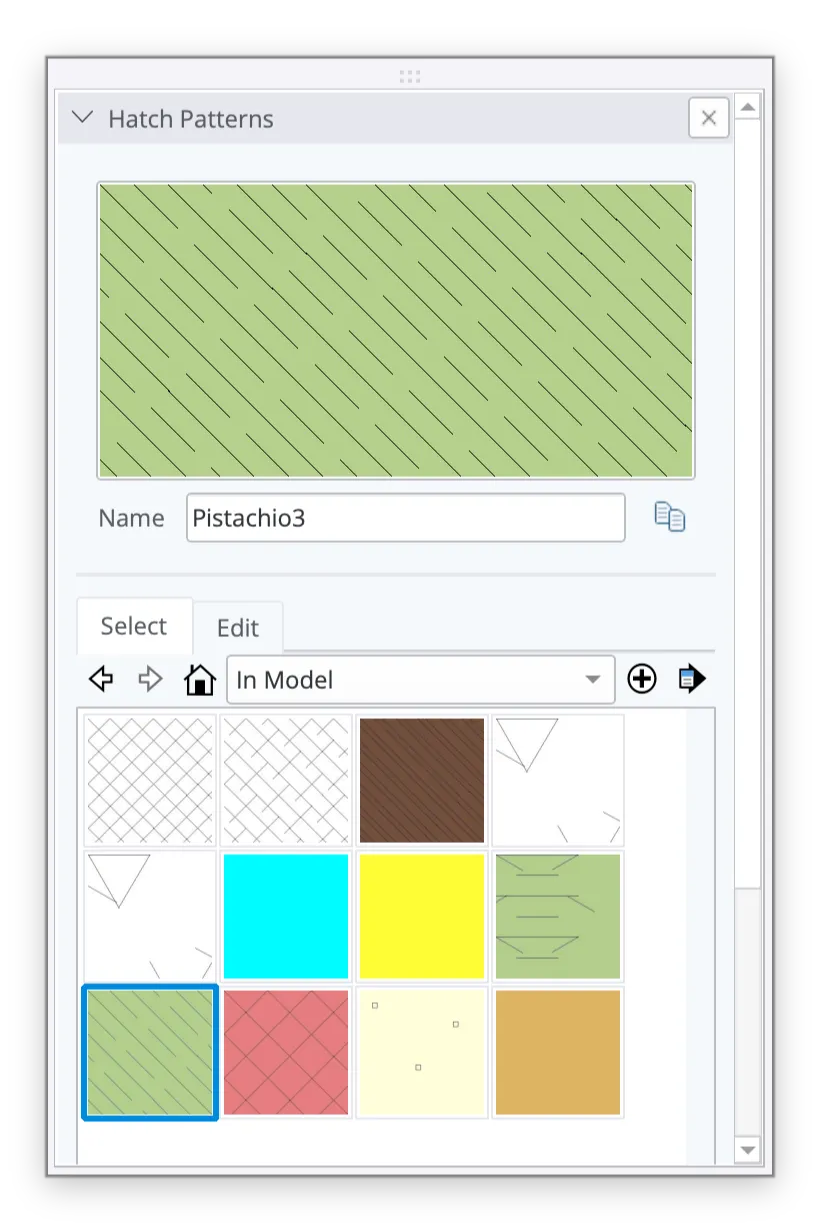
The part I like most is how you assign them. You can link a hatch to a material through its Section Fill option, so every face painted with that plywood material cuts with a plywood hatch automatically. Or you can set a fill on a specific group or component through Entity Info, which overrides whatever the material says. A new "Override Section Fill by Style" toggle lets you switch back to one uniform fill when you want the classic look for a quick diagram.
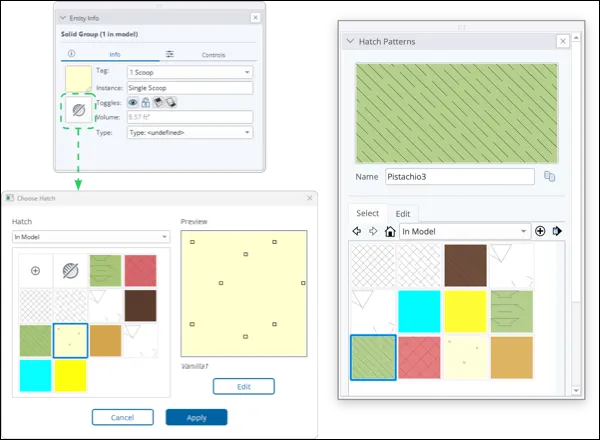
For the Kitchens & Baths and Cabinetry & Built-Ins students, this is the change that pays for the upgrade by itself. Cabinet boxes, countertops, wall sections and built-in details can finally read like shop drawings without leaving SketchUp and LayOut. Expect this to work its way into the Kitchens & Baths course documentation lessons as I put it through real projects.

The New Procedure Toolbar: Copy Along, Follow Me, Solid Tools
The second big addition is a Procedure toolbar with three tools that produce what Trimble calls Procedural Components. Think of them as groups that remember how they were made, so you can go back and change the inputs instead of rebuilding.
Copy Along is brand new. Pick a group or component, pick a path, set the spacing, and SketchUp duplicates it along the path. The path, the copies and the spacing all stay editable afterward. Balusters along a curved railing, pickets along a fence, pavers along a walkway, pendants over an island, tile along a backsplash. Every one of those is a manual move-and-array exercise today.
Follow Me got the upgrade I've wanted since I started teaching cabinetry. It now runs multiple extrusion profiles inside a group or component in a single pass and keeps the materials and attributes on each one. Crown, light rail and base can sweep around a room together, with the right materials already applied.
Solid Tools now work on Procedural Components too, so a sink cutout or a notch for a pipe chase stays editable instead of being burned into the geometry. They also preserve the original hierarchy, tags and classifications wherever they can, which fixes a long-standing complaint about Solid Tools flattening your organization.
When you're done being clever, the right-click menu has a new "Explode to Inputs" option that drops the procedural wrapper and leaves plain geometry behind. Trimble says more Procedures are coming in future releases, which tells you where SketchUp is headed.

One Interface for Windows and Mac, Plus Tabs
Have you ever followed along with a tutorial recorded on Windows while sitting at a Mac, hunting for a panel that lives somewhere else? That ends with 2027. SketchUp and LayOut now share one interface on both platforms, built on the Windows design. Mac users get dockable toolbars, dockable trays that hold several panels, a revised Materials panel and library, and a dockable Ruby Console.
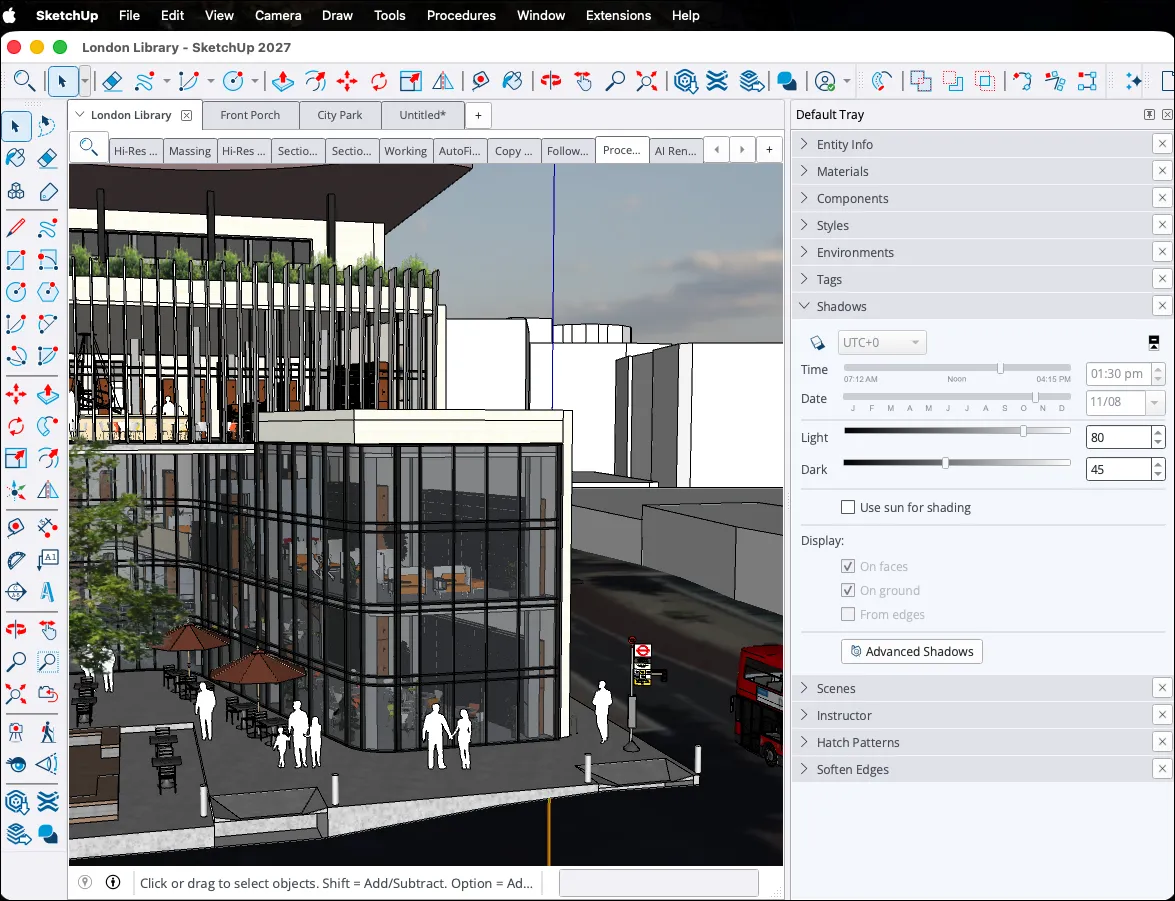
For my Windows students, almost nothing moves. For Mac students, the first week will feel different, and after that my course videos will match your screen for the first time. I'll take that trade.
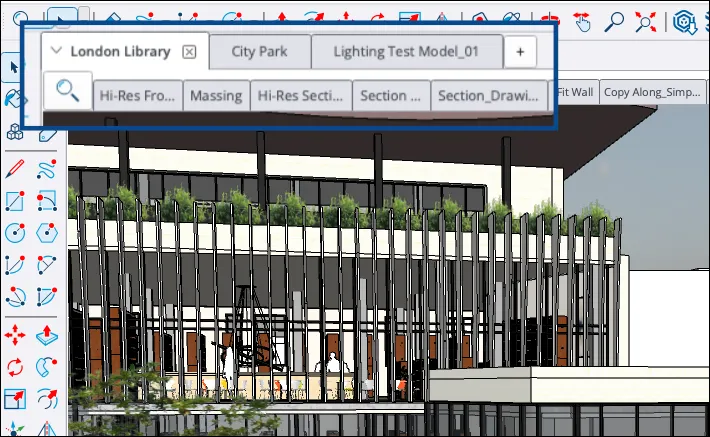
The other workflow change is multiple document tabs. You can open several models in one SketchUp window, with a tab row above the Scene tabs. Hover a tab to preview the file, click the plus to start a new one, reorder them, or drag a tab off the dock into a floating window you can park on a second monitor. Close the last tab and SketchUp stays open and shows the Welcome window. If you've ever had a client file, your component library and a detail model open as three separate SketchUp windows, you'll feel this one immediately.
LayOut: Image Adjustments, Paperless Draw Mode, Faster Linework
LayOut picked up three changes worth knowing.
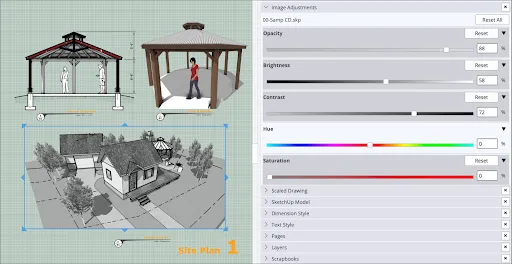
Image Adjustments give every SketchUp viewport and image non-destructive controls for opacity, brightness and contrast, and hue and saturation, including full desaturation, with a Reset All button. Grey out a context plan, fade a background image, or pull the color out of an existing-conditions viewport without touching the model.
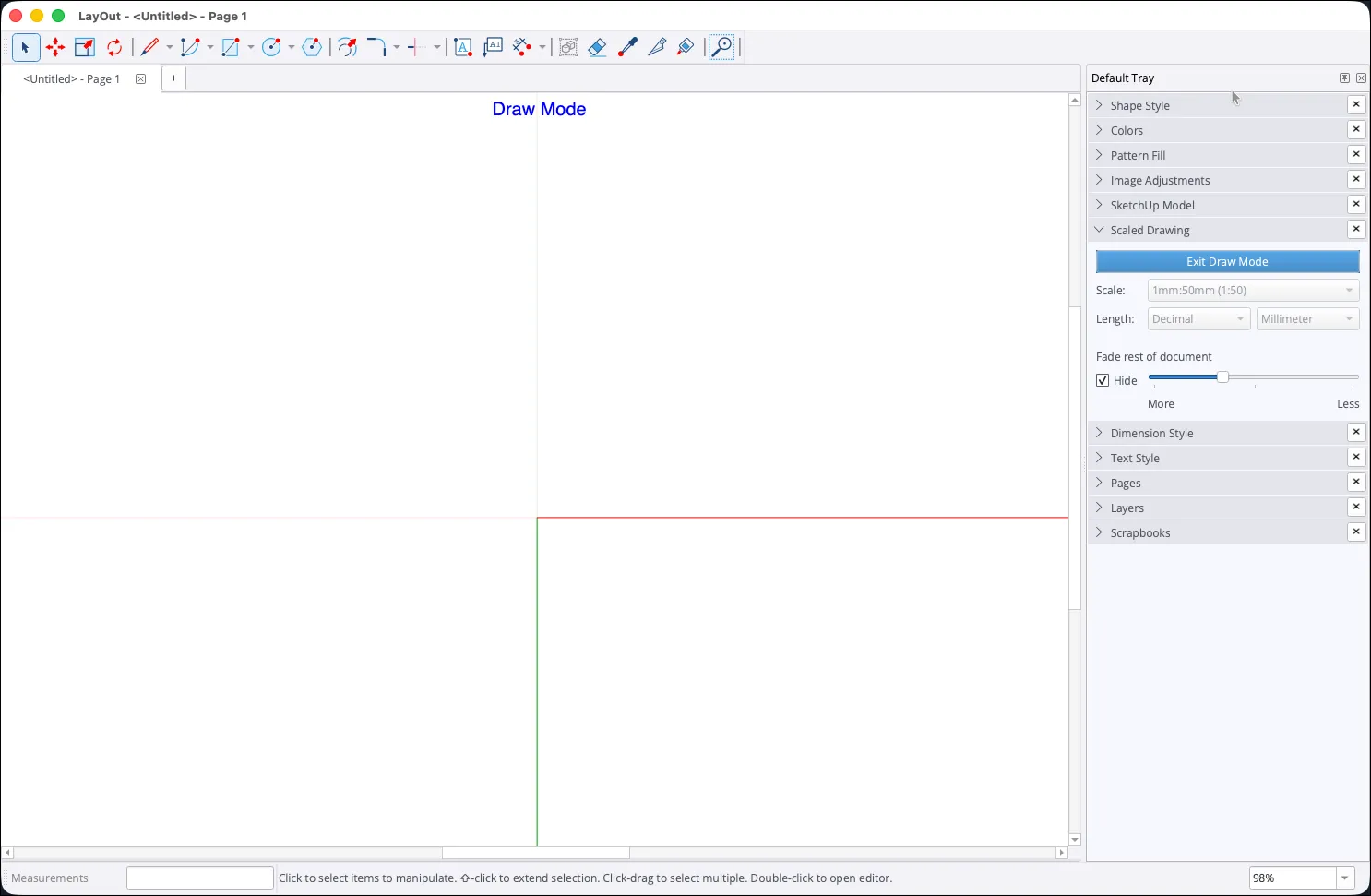
Draw Mode in the Scaled Drawing panel opens a paperless canvas with red and green axes at the origin so you can draft a detail at 1:1 in real-world units. When you exit, LayOut converts the work into a scaled group, 1/4" = 1' for imperial or 1:50 for metric by default, and you can change the scale before or after. Selecting a SketchUp viewport first pre-fills its scale.
Hidden line rendering runs on a new engine that Trimble says drastically cuts the time to generate vector linework. It's a Public Labs feature that's on by default, and you can switch back to the classic engine in Preferences if something looks off. If your construction documents have ever crawled while viewports render, this is the quiet feature you'll appreciate most.
The Smaller Things Worth Knowing
A few items that don't need their own section:
- AutoFit Live Components: drag a Live Component onto a face and it resizes and orients itself to fit, even on faces inside other groups. Only applies to Live Components, so it doesn't change how your own library behaves.
- Outliner Sort By Tags: the Outliner can now group component instances by tag instead of only by hierarchy.
- Touchpad support on Windows: one-finger orbit with Ctrl+Alt and pan with Shift+Ctrl+Alt, matching what Mac laptops already had.
- Coordinate reference systems: Add Location accepts CRS files and easting/northing entry, mostly useful for landscape and site work.
- Nothing on AI or rendering: the notes don't mention Diffusion, 3D Warehouse or any rendering change. Your rendering workflow, whether it's V-Ray, D5 or AI, is untouched.
Which Features Matter for Which Course
Here's how I'd map the release onto the way designers in each of my courses work.

Interior designers get the most from tabs, image adjustments and Copy Along for repeating fixtures. Kitchen, bath and cabinet designers get hatches, the multi-profile Follow Me and editable Solid Tools, which is as good a release as that group has ever had. Students in the landscaping bootcamp get Copy Along for pickets, pavers and balusters, plus the coordinate reference system support for sites.
A Note on Extensions
This is the year to check your extensions before you commit. SketchUp 2027 moves its embedded Ruby from version 3.2 to 3.4, updates the embedded browser that extension dialogs run in, and rebuilds the Mac interface on a new framework. Most well-maintained extensions will be fine, but anything that hasn't seen an update in a while could misbehave, especially on Mac.

The FOCUSED 3D Library extension is fully compatible with SketchUp 2027. The one worth flagging: the company that makes Profile Builder, Bevel Tool Quantifier Pro, and Artisan 2 has posted a notice on their site saying they expect to release remaining SketchUp 2027 compatibility updates by October 30. If you rely on any of those — and a lot of the cabinetry and carpentry designers in my courses do — hold off on converting until that update is out.
My Honest Impressions
I'm part of SketchUp's beta testing program, so I see what the team is working on before a release ships. Going into 2027, there were things I was hoping would make it in that didn't. My honest read on this one: it's a light version.
That said, two things genuinely excite me, and they both come down to how I teach.
The unified interface has been on my wish list for years. Every time a Mac student works through my lessons, their screen looks different from mine — different panel locations, a different Materials panel, no docked trays. It created constant confusion. That ends with 2027. It also means I can finally re-record my courses knowing the videos will match what every student sees, whether they're on a Mac or a PC. I've been waiting for this version before doing that. Now I'm going to be busy for a while.
Tabbed projects feel small until you actually have the problem they solve. I don't usually have more than one file open, but there are cases where I'm working from a helper model alongside my main project file — two separate SketchUp windows, which is messier than it sounds. Tabs clean that up.
The Procedure toolbar is a good addition, and certain designers will get real value out of it. For me personally, Copy Along is probably the one I'll reach for most, though I already have an extension that does the same thing. I rarely use the built-in Follow Me tool because Profile Builder 4 handles complex profiles so much better — I love that extension. And Solid Tools have never been a big part of my workflow. If you're into cabinetry, carpentry, or furniture making, these are for you.
Section hatches are genuinely nice, especially if you document in LayOut. The designers in my courses who produce full construction document sets will feel this one most.

Should You Upgrade Now?
Short version: hold off for now, especially if you use Profile Builder, Bevel Tool Quantifier Pro, or Artisan 2. The developers expect their 2027 compatibility updates by October 30. Once those land, Windows users can install 2027 alongside 2026 and start exploring hatches and Copy Along. Apple silicon Mac users should give it a bit longer for the interface change to settle. Intel Mac users stay on 2026 regardless.

If you want context on how this release compares, my SketchUp 2026 review covered a performance-and-polish year. 2027 is the opposite: fewer under-the-hood tweaks and more tools you'll touch every day.

Frequently Asked Questions
What's new in SketchUp 2027?
The headline features are section fill hatch patterns, a new Procedure toolbar with Copy Along, a multi-profile Follow Me and procedural Solid Tools, multiple models open in tabs, and one unified interface for Windows and Mac. LayOut adds image adjustments, a paperless Draw Mode and a faster hidden-line engine.
Does SketchUp 2027 run on Intel Macs?
No. SketchUp 2027 requires Apple silicon. Intel Mac users should stay on SketchUp 2026 until they replace the machine.
How do section hatches work in SketchUp 2027?
Hatches live in a new Hatch Patterns panel. You link one to a material through its Section Fill option, or set one on a specific group or component in Entity Info, which overrides the material. A toggle in the Styles panel lets you fall back to a single uniform fill.
Will my extensions work in SketchUp 2027?
Most actively maintained extensions will, but 2027 upgrades the embedded Ruby to 3.4, updates the dialog browser and rebuilds the Mac interface, so test every extension you rely on before moving a live project. Keep 2026 installed alongside 2027 as a fallback.
Did SketchUp 2027 add any AI or rendering features?
No. The release notes cover modeling, documentation, interface and interoperability changes only. Your V-Ray, D5 or AI rendering workflow is unaffected.
Every year I ask the same question of a new SketchUp release: does it change how a working designer gets from model to drawing to client? Most years the honest answer is "a little." This year it's "yes, in the drawings." Hatches and Copy Along alone will save hours on every set of construction documents, and the single interface means the lessons you learn look the same on whatever machine you own. Give it until the end of October for the extension compatibility window to close, then install it next to 2026, open a copy of a real project, and go find a cabinet section to hatch.
Tags