


V-Ray 7.2 for SketchUp – What’s Changed and Why It Matters
When I first heard about V-Ray 7.2 (Update 2) for SketchUp, I was immediately curious: could this release actually push the boundaries of what I expect from architectural rendering workflows? After reviewing Chaos’s blog and coverage in the trade press, here’s how I see the update — what’s new, what’s promising, and what to watch out for as you upgrade or adopt these features.
Key Takeaways:
- V-Ray 7.2 brings three new AI-based features in beta — AI Enhancer, AI Upscaler, and expanded use of AI Material Generator.
- There’s a new procedural night sky system (moon, stars, Milky Way) tied to real-world location and time.
- The update adds deeper control over scattering, texture randomization, exposure, and new tools like eyedropper and strand sampler textures.
- On the infrastructure side, support for 3D streaming via Chaos Cloud, GPU enhancements, and improved memory footprint help make bigger or more interactive scenes more feasible.
Table of Contents
*Affiliate links may be used throughout this article. Read our Privacy Policy for more information.
What’s New (and What I’m Most Excited About)
There are a lot of new features in this version – some I like – some I don’t need. Here is my breakdown:
AI Tools That Do the Heavy Lifting
One of the biggest shifts in 7.2 is how deeply AI is integrated into the V-Ray workflow. Rather than just as experimental tools, these new features feel like attempts to part of your routine.
- AI Enhancer (beta)
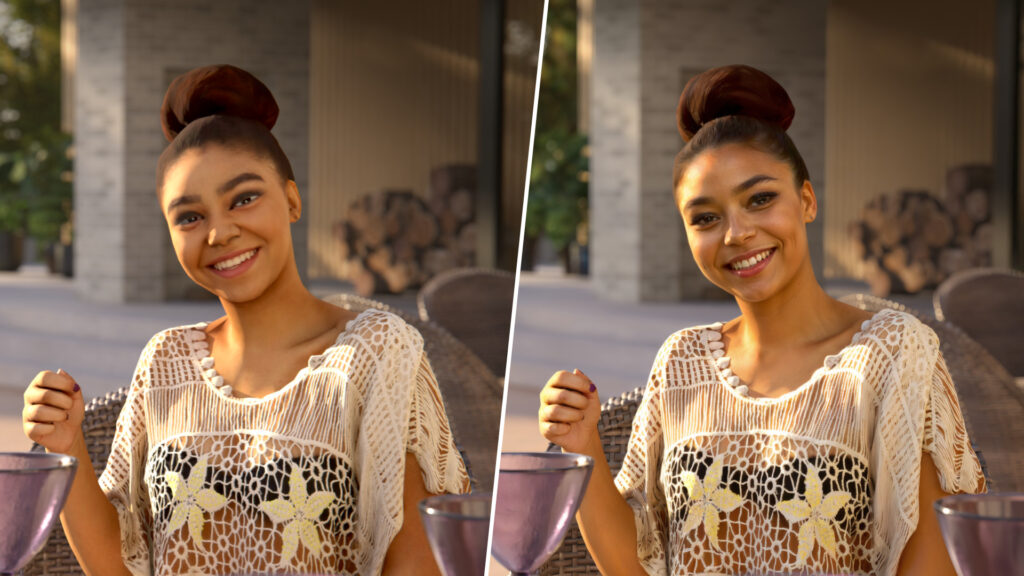
This tool can refine realism in people, foliage, terrain, or vegetation without re-rendering the full frame. You can fine-tune traits like age, clothing, or “look” for people, or alter vegetation appearance for consistency or variation. Enscape has had this feature for awhile, so it was only a matter of time until they brought it over to V-Ray.
- AI Upscaler (beta)
Probably one of the most buzzed features: it lets you take a lower resolution render or draft and upscale it up to 16K, preserving geometry, crisp edges, textures, and even denoising grain without oversmoothing. Chaos positions it as especially useful for turning quick drafts into presentation-ready visuals in minutes. - AI Material Generator (beta)
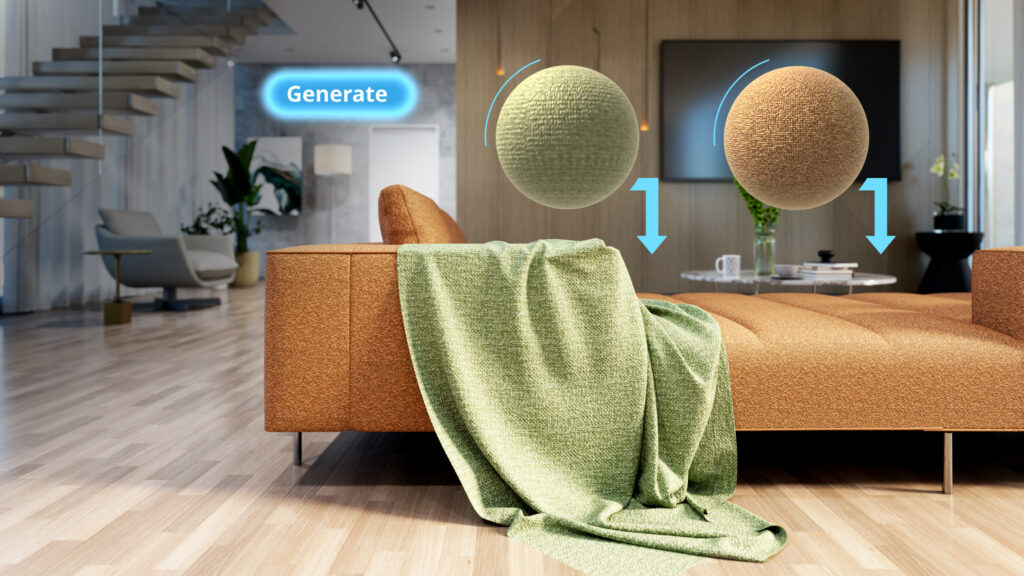
This was already part of previous updates but is further leveraged now: you can convert a real-world photo into a full PBR (physically based rendering) material — complete with maps — right inside Cosmos.
These AI tools can save time, but they also invite questions: How much control do you lose when you rely on AI? How good is the output for architectural/constructed surfaces (doors, glass, custom metals)? In forums, I’ve seen cautious optimism, and some skepticism: for instance, one user wrote:
“AI Mats … works well for rocks, and cobblestone … for non-organic surfaces you still have to adjust a lot.”
So I see these as powerful assistants — especially for vegetation, organic elements, or fast prototyping — but not a full replacement for human oversight.

Shop Laptops & Desktops for SketchUp
Download my FREE SketchUp and V-Ray Hardware Guide to get links to my recommended laptops for SketchUp!
Night Sky, Lighting & Atmosphere — With Precision
One of the features I’m most excited to test is the procedural night sky system. Now, renders can include a full sky with stars, moon, even the Milky Way, tied to actual geographic location, date, and time. As those celestial elements also influence global illumination (not just decorative), you can get more believable atmospheric nuance in night renders.

This is a big leap over flat black skies or simplistic HDRI backdrops. The ability to dial in moon phase, brightness, star distribution gives me more control over mood and storytelling in nighttime scenes.
Deeper Control: Scatter, Exposure & Texture Tools
Beyond the headline AI features, 7.2 offers a slew of refined controls and new tools that make renders more flexible and detailed:
- Scatter Enhancements — Chaos Scatter now supports clustering, altitude limits, and “look-at” orientation controls, letting you create more natural groupings (flower patches, orient plants toward sightlines) rather than uniform distributions.
- 3D Gaussian Splatting Clipping — For scenarios using 3D scans or point clouds, you can now apply clipping masks to splats, blending scanned geometry more seamlessly with surrounding mesh.
- New Textures & Tools — They’ve added a new Water Surface texture (for ocean/large water bodies), a Strand Sampler texture for controlling shading of hair, grass, fur, and an Eyedropper tool (in the color picker and gradient) so you can sample color from anywhere onscreen.

- Enhanced Exposure Layer in VFB (Frame Buffer) — Now you have separate control over Highlights, Shadows, Whites, Blacks in post (inside VFB) so you don’t need to bounce back to Photoshop or external color correction as often.
- Texture Randomization — A more advanced randomization engine that introduces subtle variation across texture instances, breaking tiling and enhancing realism.
These refinements may seem incremental, but combined, they give you far more latitude to craft detail and reduce manual cleanup.

Get My SketchUp Cheat Sheet!
A 2-sided PDF that you can print and reference as you learn and use SketchUp!
Infrastructure & Workflow Upgrades
The power of new features only shines when they’re usable. That’s where the under-the-hood and workflow changes in 7.2 matter:
- 3D Streaming (Chaos Cloud Collaboration, beta)
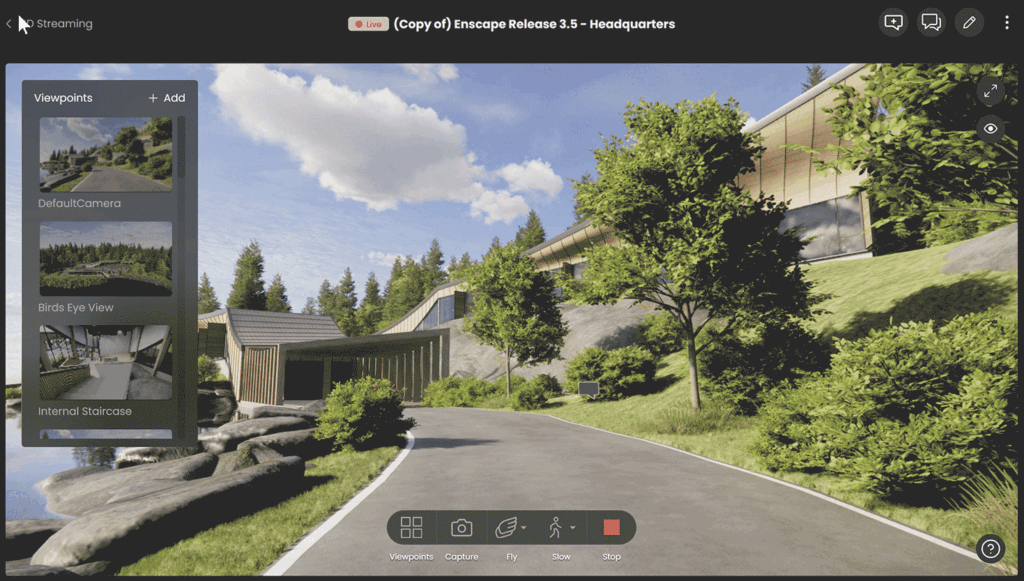
Now you can upload a scene to the cloud and share a simple link that allows clients or collaborators to navigate the model, place pins, leave comments — all in a browser, even on phones. It sidesteps sending massive files and ensures everyone is “inside” the live scene.
- GPU and Memory Improvements
Chaos upgraded the GPU infrastructure, which helps render larger scenes more efficiently, with lower cost and faster speeds. They also increased memory ceilings (e.g. 24 GB GPU memory mentioned) to accommodate more complex geometry and assets. In addition, V-Ray GPU now supports Gaussian Splats, luminaires, and caustic dispersion — features previously reserved for the CPU engine.
- Chaos Cosmos & Asset Presets
Cosmos now includes Generic Presets (for standard use-case materials or assets) and allows multi-import of assets. That gives you a jumping-off point instead of building everything from scratch.

What It Means for Your Workflow (From My Perspective)
When I think about integrating V-Ray 7.2 into a real production pipeline, several observations stand out:
- Faster iteration and presentation
The AI Upscaler is a game changer for me. I can render low-res drafts fast, iterate design changes, then upscale for client previews or boards, without re-rendering to full resolution each time. That saves time, especially on complex scenes. - Less reliance on external post
Between the improved exposure controls, sharpened scatter/texture tools, and better randomization, I anticipate fewer trips into Photoshop or external tools. That consolidates more visual control inside V-Ray itself. - More expressive night & atmospheric scenes
Nighttime shots have always been a bit of a pain — balancing lighting, sky, mood. The procedural night sky tied to real location/time is a feature I’ll test heavily. It may reduce the “fudging” clients often ask for. - Client collaboration becomes more seamless
The 3D streaming link means clients can walk the model in a browser, leave comments, and see context without needing to install heavy software. That’s especially helpful in remote or feedback-heavy workflows. - Be prepared for AI tradeoffs
While AI tools are powerful, I expect to keep an eye on artifacts, over-smoothing, or misinterpretation. For architectural, hard-surface materials like metal, glazing, or custom cabinetry, I’ll still rely on manual tweaks. Also, because AI Enhancer is cloud-based, you depend on server uptime and potentially usage fees. - Hardware matters more than ever
Because 7.2 enables heavier scenes, larger memory budgets, and GPU features, investing in better GPU hardware (or leveraging Chaos’s infrastructure) will pay off more. The GPU engine now supporting features like splats and luminaires means your local render machine has more options — not just CPU fallback.
Learn to Create These Renders in 7 Days
My 7-Day SketchUp Bootcamp for Interior Design will take you step-by-step from installing and configuring SketchUp, all the way to using V-Ray to create the photorealistic images you see below…all in 7 days!


Overall, this update feels like a pivot: V-Ray is pushing to not just be a powerful render engine, but a more intelligent, assisted, design tool — less of a manual grind and more of a design companion.
But here’s the thing – all of these enhancements are already in D5 Render, which offers real-time rendering, as well as other features that V-Ray does not have, such as AI Image Sampling (creates materials from an uploaded image), one-click water materials, and the ability to create animation videos much faster than in V-Ray.
But D5 Render comes with limitations – mainly that you have to have a beefy computer with a dedicated graphics card, and it only runs on the Windows operating system.
I like that V-Ray is able to run on both Windows and Macs, and you don’t need a dedicated graphics card to use it (just be prepared to use the Chaos Cloud for production renders). That’s why it’s still my overall preferred rendering engine for SketchUp.
Frequently Asked Questions
No — they’re in beta. That means they are valuable for exploration, drafts, or augmentation, but I wouldn’t fully depend on them when stakes are high (e.g. final deliverables) without verifying output and having fallback control.
The idea is the Upscaler preserves sharp geometry, textures, lighting, and can denoise fine detail. But it may not always perfectly match a true full render at 16K for every material or effect. Use it as a high-quality shortcut, not a blind substitute in all cases.
Absolutely. The AI tools are optional; you can still build, edit, and tweak PBR materials by hand as before. The AI Material Generator is just an assist — often you’ll want to refine or override parts of its output.
It broadens the scope of what GPU mode can handle, but not every feature or complex scene will perform equally well on GPU. Some fallback or hybrid CPU/GPU use may still be necessary, depending on scene complexity and hardware.
- Double-check that AI tools (if used) haven’t introduced subtle artifacts, especially on hard surfaces or custom work.
- Revisit lighting set-ups, especially for night scenes, to account for the new sky/sky light behavior.
- Test scatter/texture randomization to confirm your materials remain consistent and don’t break tiling or produce undesired variation.
- If collaborators or clients use different versions, ensure backward compatibility (you may want to keep a fallback to older versions for scenes you must revisit).
- Monitor resource usage: 7.2 can demand more GPU memory or render capacity, so hardware or cloud scaling may need adjustment.

Ready to Learn SketchUp?
Check out my SketchUp & V-Ray courses to find the right one for your skillset and your design specialty. Online, self-paced, and lifetime access!
Tags