

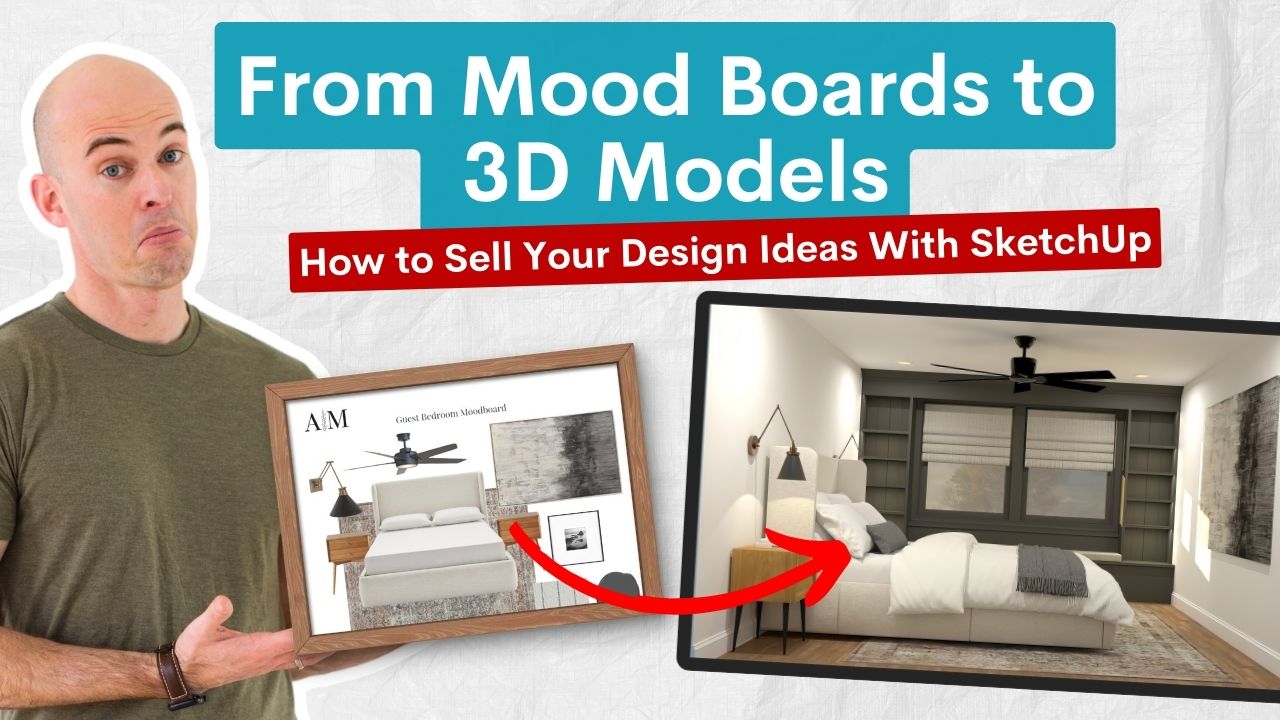
From Mood Boards to 3D Models: How to Sell Your Design Ideas With SketchUp
I’ve been in the design world long enough to see a major shift take place—and if you’re a working designer, you’ve probably felt it too.
Clients used to be excited by mood boards, Pinterest collections, and 2D floorplans. Now, they hesitate. They ask more questions. They want to see everything before giving the green light. And let’s be honest—it’s not because they don’t trust your talent. It’s because they can’t visualize your design clearly enough to feel confident moving forward.
And that’s exactly where 2D falls short.
Key Takeaways:
- 2D design tools fall short — Clients struggle to visualize and commit based on mood boards and flat plans alone.
- 3D models build trust — SketchUp and V-Ray renderings give clients clarity and speed up approvals.
- Better visuals = higher value — Photorealistic presentations help justify your fees and win better projects.
- 3D is easier than you think — With the right system, you can learn SketchUp and V-Ray quickly and confidently.
Table of Contents
*Affiliate links may be used throughout this article. Read our Privacy Policy for more information.
The Problem With 2D Presentations
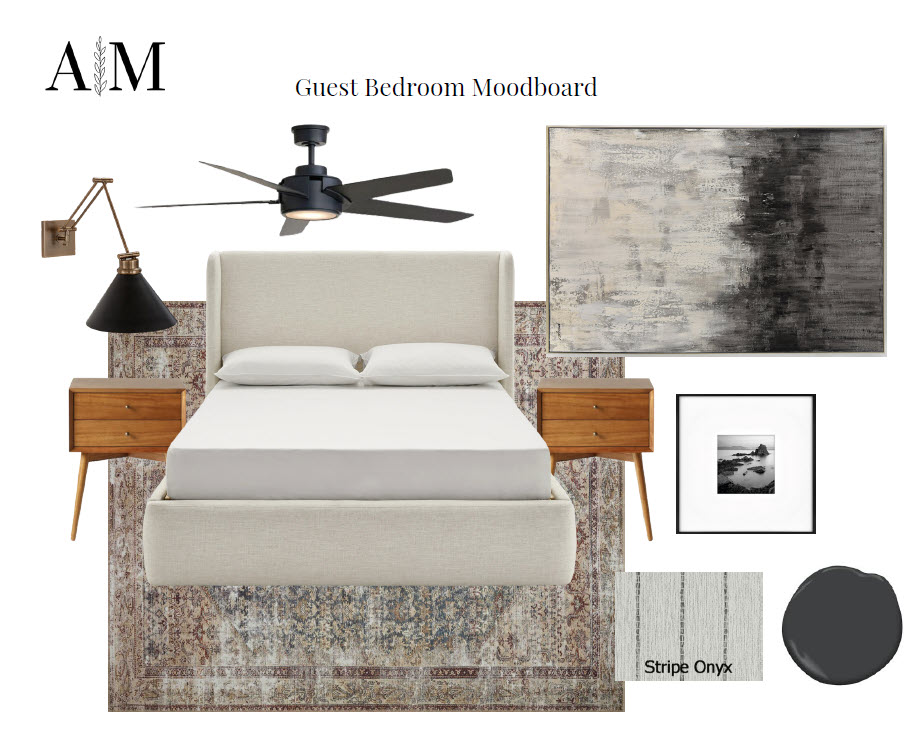
I don’t say this to knock mood boards or hand-drawn sketches—they’re beautiful tools that I still include in design packets. But in a slower economy, where every client dollar is scrutinized, “inspiration” isn’t enough.
Clients want certainty.
They want to know that their $120,000 kitchen renovation or $80,000 backyard refresh is going to look exactly how they imagine it. And unless you’ve mastered the ability to read minds, your safest bet is to show them—not tell them.
Here’s what I kept running into when I relied mostly on 2D tools:
Clients asking, “Wait, how far does that cabinet stick out again?”
Confusion over lighting placement or sightlines
Endless back-and-forth about scale, proportion, and finishes
Scope creep driven by uncertainty, not intention
I realized I was working harder than I needed to. But more importantly, I realized that I was not giving my clients the level of quality that I would want from a Designer. I want to see things in 3D…I want to see how every material and finish works with one another…and I wanted my brand to be elevated.
That’s when I doubled down on SketchUp and V-Ray.
The Shift to 3D: Clarity Sells
I started using SketchUp to build full models—rooms, kitchens, basements, whatever the project called for—and layering in photorealistic details with V-Ray.
That’s when things started to click for my clients. And more importantly, things started to sell.
Because the truth is, a client might not fully understand your design intent from a 2D elevation or a mood board of neutral sofas and brass finishes. But when they see a lifelike render of their own future space? The hesitation vanishes. The excitement builds. The “we need to think about it” turns into a “when can you start?”
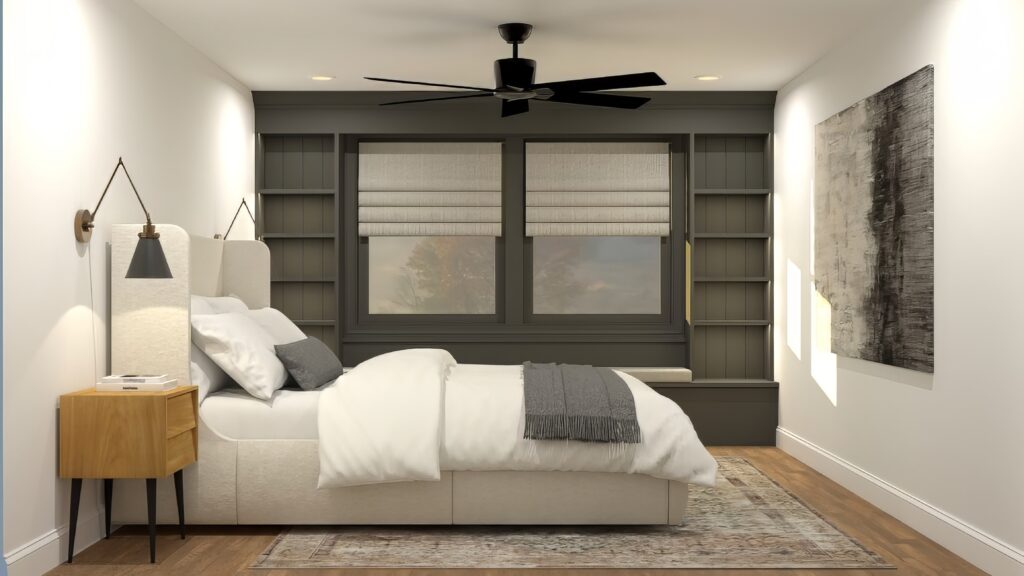
Here’s what happened after I moved from mood boards to 3D:
My presentations became client-proof. No more lengthy explanations—just reactions like, “Wow. That’s exactly what I pictured.”
Approvals got faster. Fewer rounds. Less uncertainty.
I felt more confident in my proposals, which allowed me to charge more for the value I was providing.
I stopped competing on price and started competing on vision.
In fact, I switched my services to ALWAYS include rendering (was an add-on before) and clients ate it up. And it boosted my revenue!
Why Visuals = Value
If you’re trying to stand out in today’s market, you need more than a pretty design. You need to position yourself as a professional—someone who can communicate vision, lead decisions, and reduce the risk clients feel when hiring a designer.
That’s what 3D renders do. They remove ambiguity.
And when ambiguity disappears, your value becomes clear. It’s no longer “should we go with them?” but rather “can we afford not to?”
If you’re a designer who’s already spending hours sourcing images, piecing together layouts, and fielding a million follow-up questions—trust me when I say this: you’re already doing the hard part. Switching to a 3D workflow doesn’t mean more effort. It means more efficiency.
Learn to Create These Renders in 7 Days
My 7-Day SketchUp Bootcamp for Interior Design will take you step-by-step from installing and configuring SketchUp, all the way to using V-Ray to create the photorealistic images you see below…all in 7 days!


But Isn’t 3D Hard to Learn?
That’s what I thought too.
I had downloaded SketchUp many years ago, fiddled around with it, and gave up. The interface felt clunky, the learning curve steep, and I didn’t have hours to waste clicking around YouTube hoping to figure it out.
I eventually came back to it when I realized we needed to provide renders to clients, and this time I dove in harder. Youtube, blogs, courses…anything I could get my hands on to piece together the workflow I needed for my projects.
After learning it all and looking back on my experience, I thought “there is a much easier way I could have learned all of that”. A few months later, FOCUSED SketchUp launched.
That’s why I built my training programs the way I did—to give designers a focused, efficient way to go from “I’ve never touched 3D software” to “I’m sending clients photorealistic renders and they’re blown away.”
If you want to learn SketchUp and V-Ray in a way that’s structured, design-focused, and tailored to real-world projects like kitchens, bedrooms, landscapes, and more, I’ve created step-by-step bootcamps for exactly that.
You don’t need to become a software geek. You just need a system that teaches you what to focus on, what to skip, and how to integrate 3D into your process without burning out or falling behind.

Shop Laptops & Desktops for SketchUp
Download my FREE SketchUp and V-Ray Hardware Guide to get links to my recommended laptops for SketchUp!
The Takeaway
Mood boards, sketches, and inspiration photos will always have a place in the design process—but they shouldn’t be the final deliverable. Not anymore.
If you want to attract better clients, streamline your projects, and get paid for your full value, moving to 3D isn’t just an option—it’s the path forward.
And I promise: once you see your first render come to life—and watch your client light up when they see it too—you’ll wonder how you ever pitched a project without one.
If you’re ready to make that shift, I’d love to help. My 7-Day Bootcamps and Core Training Programs are designed to meet you where you are—and take you where you want to go.
Let’s bring your designs to life—one render at a time.
Frequently Asked Questions
Nope. Many of my students come in with zero experience. My courses—especially the 7-Day Bootcamps—are designed to guide you step-by-step, even if you’ve never opened SketchUp before.
It can be—if you’re piecing it together through YouTube tutorials. That’s why I built the FOCUSED Method™, which teaches only what you need (and skips what you don’t). It’s fast, structured, and design-focused.
Absolutely. 3D isn’t a replacement—it’s a powerful enhancement. You’ll still use mood boards and concept work, but now you’ll also show clients exactly what their space will look like before any work begins.
Not at all. My teaching style is made for visual learners and creative thinkers. If you can use Pinterest, you can learn this. Plus, you’ll have access to support via email, a private Facebook group, and coaching calls.
The best place to start is with one of my 7-Day Bootcamps or Core Courses. They’re built specifically for interior designers, kitchen pros, landscape designers, and DIYers—focused, efficient, and client-ready.

Ready to Learn SketchUp?
Check out my SketchUp & V-Ray courses to find the right one for your skillset and your design specialty. Online, self-paced, and lifetime access!
Tags