V-Ray Light Gen – Generate Realistic Lighting in SketchUp
Key Takeaways: V-Ray Light Gen saves time and effort in creating realistic lighting by automatically analyzing the scene and placing lights accordingly. It offers control and flexibility, allowing for manual adjustments and customization to achieve the desired lighting effect. V-Ray Light Gen create
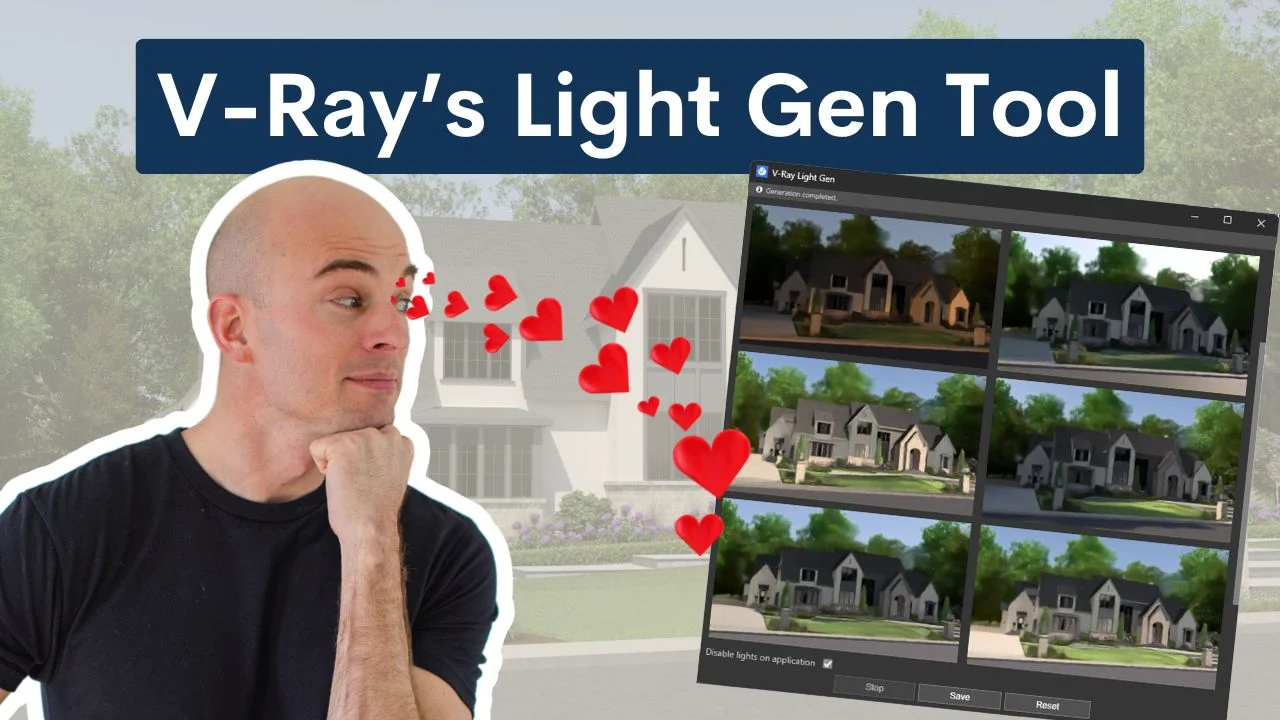
Key Takeaways:
- V-Ray Light Gen saves time and effort in creating realistic lighting by automatically analyzing the scene and placing lights accordingly.
- It offers control and flexibility, allowing for manual adjustments and customization to achieve the desired lighting effect.
- V-Ray Light Gen creates accurate and realistic results, making it a valuable tool for architectural visualization, product rendering, and interior design.
*Affiliate links may be used throughout this article. Read our Privacy Policy for more information.
Table of Contents
What is V-Ray Light Gen?
V-Ray Light Gen is a tool developed by Chaos that simplifies the process of creating realistic lighting in 3D scenes.
This powerful tool effectively simulates natural light using the V-Ray Sun along with artificial lighting, as well as various atmospheric conditions, all while maintaining the user-friendly interface characteristic of V-Ray products without sacrificing realism.
Its HDR mode and image-based lighting can be combined to produce unique styles and diverse lighting scenarios. V-Ray Light Gen is particularly beneficial for architects, designers, and visual artists aiming to achieve photorealism in their work.
How is V-Ray Light Gen Different from Other Lighting Tools?
V-Ray Light Gen is a powerful lighting tool primarily used for 3D rendering and visualization. It effectively simulates both natural and artificial light with remarkable accuracy. This tool is designed to illuminate both outdoor and indoor scenes with ease.
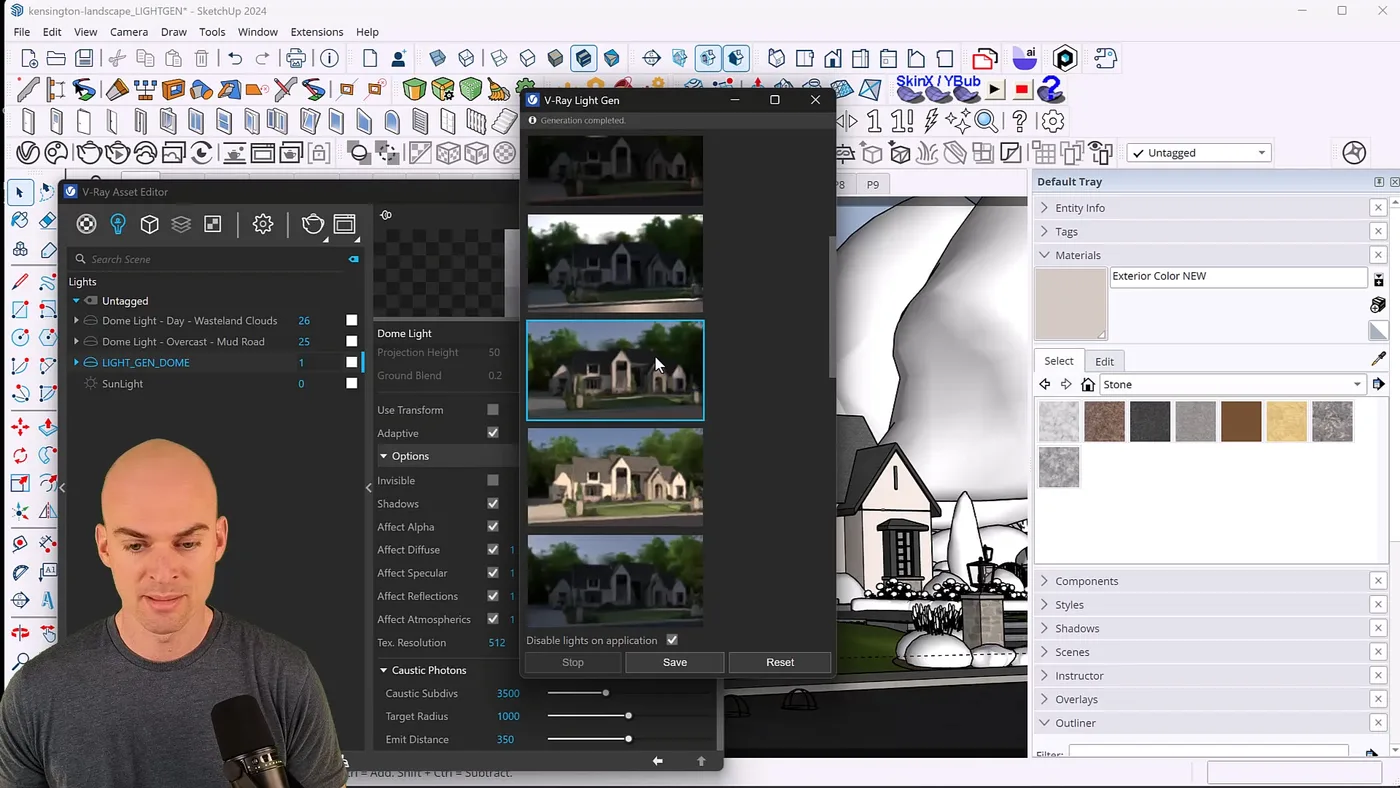
V-Ray Light Gen features an intuitive interface that streamlines the lighting process, allowing artists and designers to focus more on the creative aspects of their projects rather than the technical details. Utilizing HDR assets, V-Ray Light Gen offers a diverse range of illumination options, producing highly realistic results while requiring minimal time for adjustments.
The tool integrates seamlessly with various Chaos products and other 3D modeling software and rendering applications, ensuring a smooth workflow that enhances productivity. Its user-friendly design enables designers to quickly experiment with different lighting scenarios, fostering a more interactive and innovative design process.
Why is V-Ray Light Gen Valuable for Creating Realistic Lighting?
The value of V-Ray Light Gen in creating realistic lighting lies in its multi-layered utility, which saves time and effort while enhancing accuracy. It provides users with an exceptional level of control and flexibility, allowing them to develop their unique styles in 3D scenes.
By simplifying the process of producing realistic effects, V-Ray Light Gen enables artists to shift their focus away from technical constraints and concentrate on the creative pursuits that will help them achieve their desired final lighting results.
Saves Time and Effort
One of the most significant benefits of V-Ray Light Gen is its ability to save users considerable time and effort through a streamlined process that simplifies the setup of lighting. This efficiency enhancement allows visual artists to create stunning environments where they can concentrate on their creativity rather than getting bogged down by mundane tasks.
Tedious activities are replaced with more creative ones, as V-Ray Light Gen automates the lighting process with simple steps, enabling users to focus on the artistic aspects instead of wading through technical details. With features such as the capability to generate multiple light sources simultaneously and provide real-time previews, users can swiftly iterate on their designs. The built-in presets facilitate the quick achievement of various lighting styles, from soft ambient looks to dramatic shadows, thereby saving valuable minutes that might otherwise be spent fine-tuning the setup. The user-friendly interface allows for quick and intuitive adjustments, further enhancing productivity.
It is worth noting that users may encounter sign-in issues or receive license verification messages when initially using the tool. However, these problems can be easily resolved by ensuring a stable internet connection and the correct licensing credentials.
Key features include:
- Real-time light adjustments
- The generation of multiple light sources
- Built-in presets for quick setups
Creates Accurate Lighting
V-Ray Light Gen accurately generates light by considering factors such as altitude and azimuth, enabling users to realistically simulate both natural and artificial lighting in their scenes. This capability is made possible by advanced algorithms that analyze the position of the sun and artificial light sources, ensuring that each ray interacts with the materials and geometry of the scene.
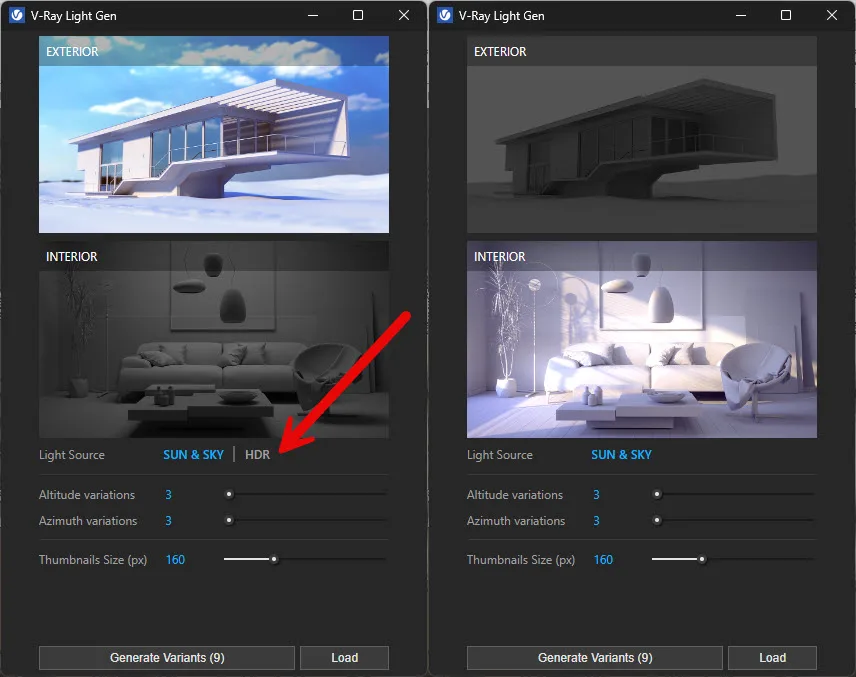
Users can modify parameters like altitude, which refers to the height of the light source, and azimuth, which indicates the direction of the light, granting artists significant control over how light influences their renders. For instance, an artist can set a high altitude for the light source to replicate the effect of the low sun during the late afternoon. This level of adjustment not only enhances realism but also encourages creative experimentation with mood and atmosphere.
Consequently, light becomes a vital storytelling tool, transforming a simple render into an evocative visual narrative. By realistically simulating various lighting scenarios, V-Ray Light Gen fosters an experience that resonates profoundly with viewers, making light an critical element of visual art.
Offers Control and Flexibility
The control and flexibility of V-Ray Light Gen enable users to tailor their lighting setups to meet the specific requirements of their projects. By utilizing custom HDR images and the asset editor, users can create the desired lighting effects.
This tool transcends basic functionalities, offering a wide range of customization options that cater to both novice and experienced artists. Users can easily incorporate their own HDR images, enhancing the realism and atmosphere of their scenes.
The asset editor serves as a powerful interface where settings such as intensity, color temperature, and light distribution can be precisely adjusted. Artists can modify parameters to accurately reflect specific times of day or particular lighting conditions.
Interactive previews provide immediate feedback, making the adjustment process intuitive and efficient. By harnessing this level of control, creators are enabled to bring their unique visions to life, transforming their scenes from ordinary to extraordinary.
Provides Realistic Results
V-Ray Light Gen produces realistic results by utilizing image-based lighting and EXR image files to create lifelike 3D scenes. By employing High Dynamic Range (HDR) images, this tool generates a nuanced and vibrant lighting environment that closely resembles real life.
It incorporates multiple EXR files, enabling artists to experiment with a variety of lighting environments, which adds depth and detail to their projects. The number of HDR images used significantly impacts the final render, with each image contributing additional lighting and shadow variation to the scene.
Artists have access to a diverse selection of HDR images, allowing them to customize lighting environments to align with their artistic vision. Furthermore, adjustments to exposure and intensity are permitted, offering additional avenues for creative expression.
Users appreciate V-Ray Light Gen for its ability to transform ordinary scenes into extraordinary visuals.
How Does V-Ray Light Gen Work?
V-Ray Light Gen analyzes a scene to automatically position lights, adjusts light intensity and color according to the scene’s requirements, and simplifies the lighting setup process for users across all supported platforms.
Analyzes Scene and Automatically Places Lights
V-Ray Light Gen automatically analyzes the scene to determine the optimal spots for placing lights to achieve the best illumination. This technology employs complex algorithms to assess the geometry, textures, and materials present in the scene. By considering factors such as the reflectivity of surfaces and the existing ambient light, the system outlines ideal light positions that will have the most significant positive impact on the final visual output.
Furthermore, integration with a chaos.com account simplifies asset management, allowing users to save, access, and modify their lighting setups quickly. This integration provides access to other digital assets and ensures that lighting can be consistently applied across various projects, ultimately saving time and effort during the rendering process.
The system also offers automated adjustments based on real-time scene analysis, compatibility with other rendering tools, and facilitates easier collaboration with team members through cloud access and the sky system.
Adjusts Light Intensity and Color Based on Scene
Each set of lighting conditions is stored in a unique lightset file that controls various parameters.
V-Ray Light Gen not only places lights but also automatically adjusts their intensity and color based on the material, reflectivity, and overall characteristics of the environment, ensuring optimal lighting conditions. This feature enhances realism and allows users to experiment with artistic aesthetics, as they can further fine-tune parameters such as brightness and color to create an atmosphere that highlights and emphasizes specific aspects of the scene.
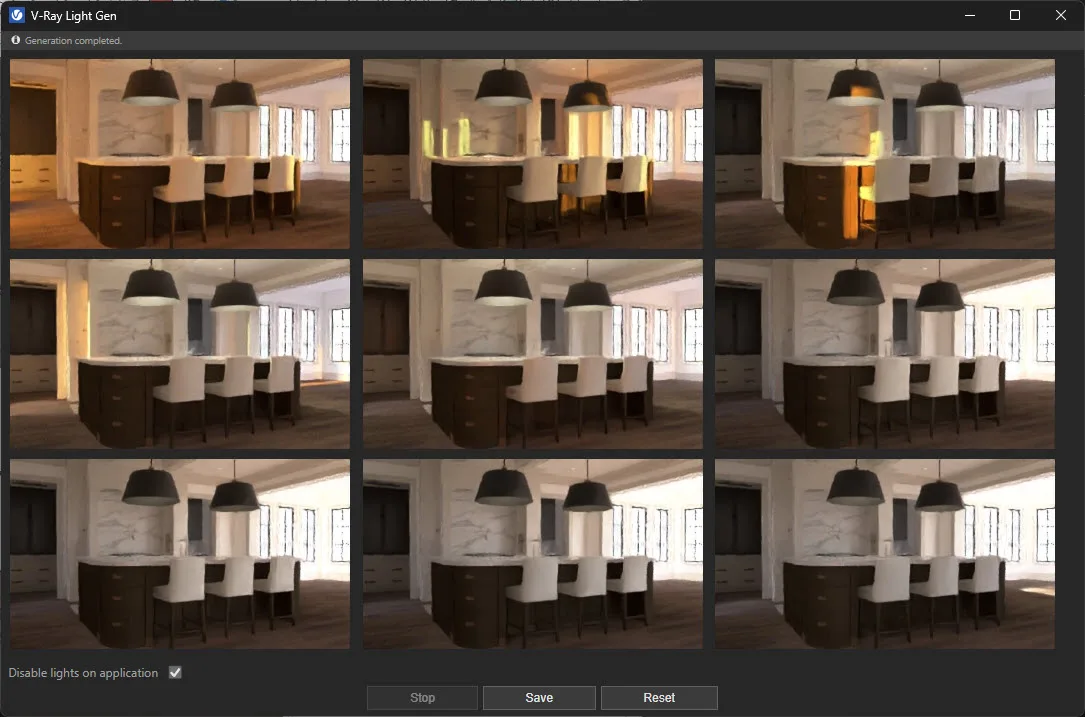
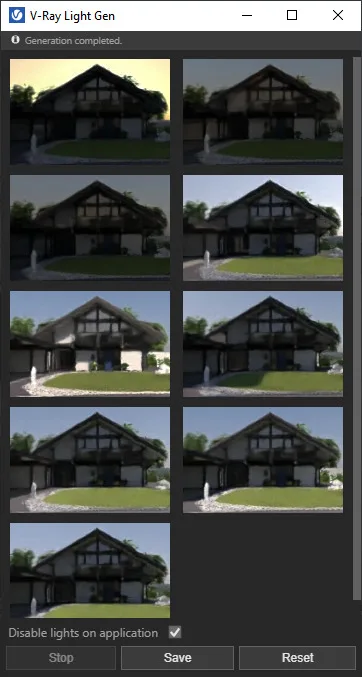
The effectiveness of V-Ray Light Gen’s recommendations is partly due to its user-friendly design. The thumbnail preview feature enables easy visual assessment of various light setups, with thumbnails clearly displaying different configurations. This allows users to swiftly iterate through options, facilitating better decision-making.
Allows for Manual Adjustments and Customization
V-Ray Light Gen enables users to customize their lighting settings to suit their preferences, offering features that enhance user control and creativity. The user-friendly interface allows for easy adjustments of customization parameters such as intensity, color temperature, and placement. The random variations in each HDR set provide users with the opportunity to experiment with different atmospheres and moods, ensuring that no two lighting conditions are identical, thus fostering creative exploration.
Additionally, users can save their custom settings to their hard drive for future use.
Customization Options for V-Ray Light Gen:
- HDRI Intensity Adjustment: Users can achieve stronger or weaker light intensity by adjusting the strength of the HDRI map in the light settings, considering altitude variations.
- Color Temperature Adjustment: The color temperature of the light source can be modified by changing the RGB color settings.
- Placement Adjustment: Users can manipulate the direction of the light by adjusting the sun’s azimuth and elevation angles, including azimuth variations.
- Configuration Saving: Customized settings can be saved to the user’s hard drive for later use.
Real-World Examples of V-Ray Light Gen in Action
Upon first visit, users can open V-Ray Light Gen and start exploring its features.
V-Ray Light Gen has been utilized across a diverse range of global industries. Notable applications include architectural visualization, product rendering, and interior design. Additionally, it seamlessly integrates with other Chaos products to deliver stunning results.
Architectural Visualization
In architectural visualization, V-Ray Light Gen is a powerful tool for creating realistic lighting that elevates the overall quality of a design presentation. By automatically generating a wide range of lighting scenarios—based on different times of day and weather conditions—it helps designers explore how light interacts with their models in a natural, dynamic way.
This flexibility allows for quick experimentation and fine-tuning, making it easier to highlight design features and set the right mood for each scene. More importantly, thoughtful lighting fosters a stronger emotional connection between the viewer and the space, which can play a key role in client satisfaction and design approval. With Light Gen, achieving that polished, lifelike feel becomes faster, easier, and more intuitive.
Interior Design
V-Ray Light Gen brings a whole new level of realism to interior design projects by simulating how light naturally behaves in a variety of interior settings. This powerful tool lets designers experiment with lighting scenarios that can dramatically change the feel of a space—whether you’re aiming for cozy and warm or crisp and modern.
It’s especially helpful when working across different design styles, where lighting does more than just illuminate—it defines mood, enhances texture, and supports the overall functionality of a room. With just a few clicks, you can explore how light interacts with materials, furnishings, and architectural details, giving you more creative control and clearer visual direction.
By generating high-quality HDRI lighting previews, V-Ray Light Gen not only saves time but also makes it easier to dial in that perfect look. The result? Interior visuals that feel real, resonate emotionally, and communicate your design intent with clarity and impact.
Kitchen Design
In kitchen design, lighting can make or break the visual impact—and that’s where V-Ray Light Gen steps in as a total game-changer. This tool makes it incredibly easy to explore how natural and artificial lighting will affect your space, from bright and airy breakfast nooks to moody, dramatic chef’s kitchens.
With just a few clicks, you can preview a variety of lighting environments that showcase finishes, materials, and layout choices in their best light. Want to see how your quartz countertop sparkles under morning sun? Or how those matte black cabinets feel in soft evening light? Light Gen helps you visualize it all—without having to manually set up complex lighting rigs.
For kitchen designers, this means faster decisions, more engaging presentations, and visuals that help clients fall in love with the space before a single cabinet is installed. It’s not just a rendering tool—it’s a lighting assistant that brings your kitchen concepts to life.
Landscape Design
In landscape design, lighting isn’t just a finishing touch—it’s a design element all its own. V-Ray Light Gen makes it incredibly easy to explore how different times of day, seasons, and weather conditions affect the mood and visibility of outdoor spaces. Whether you’re working on a cozy backyard patio or a sprawling resort garden, this tool helps you dial in the atmosphere before the first stone is placed.
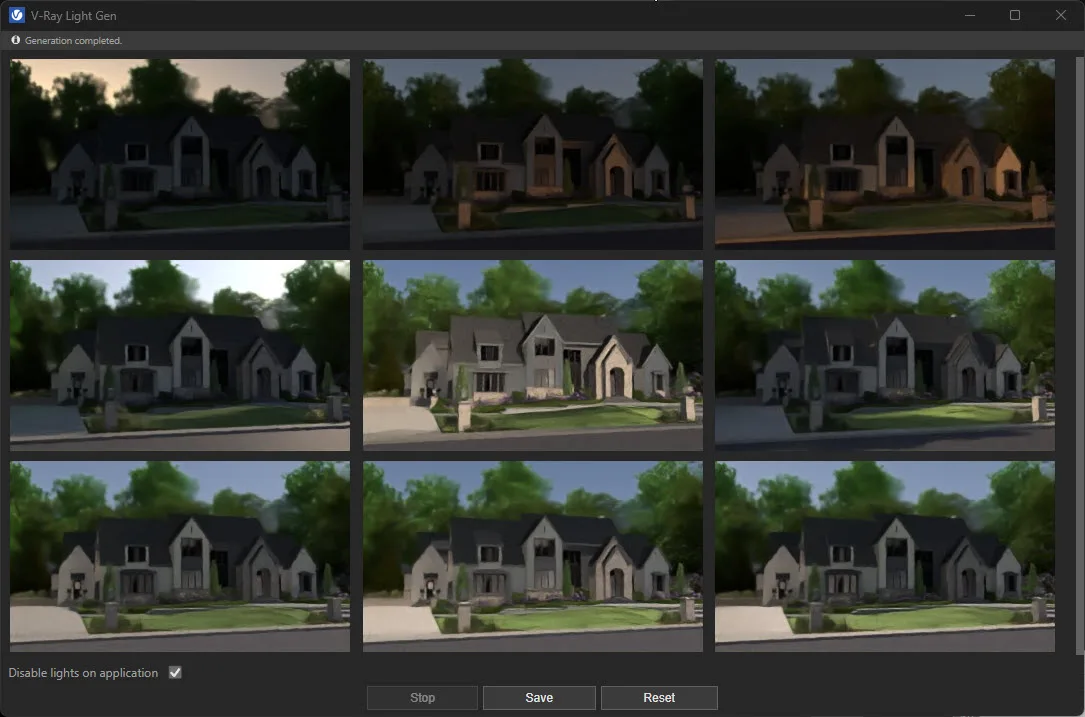
By automatically generating a range of realistic lighting environments, Light Gen gives designers the freedom to test and compare looks—golden hour glows, crisp midday shadows, soft overcast ambiance—without complex setup. It’s especially useful for highlighting materials, textures, and spatial flow in a way that resonates emotionally with clients.
For landscape designers, it’s like having a fast-forward button to final presentation. You get clearer visuals, stronger storytelling, and a much easier time communicating your vision—rain or shine.
Final Thoughts
V-Ray Light Gen is an essential tool for generating realistic lighting in 3D rendering projects due to its time-saving capabilities, flexibility, and seamless integration with Chaos products that enhance its performance. This tool offers increased power and improved output quality, making it valuable for visual outputs across various industries that require 3D rendering. Its adaptable light-generation system can create stunning visuals tailored to the needs of sectors such as architecture, interior design, kitchen & bath design, and landscape design.
The advantages of the V-Ray Light Gen tool include:
- Efficiency: A streamlined workflow that ensures faster project completion.
- Realism: Advanced algorithms that effectively mimic real-world lighting conditions.
- Compatibility: Seamless integration with a variety of design software.
Overall, V-Ray Light Gen equips artists and designers with the necessary capabilities to elevate their projects, making it a vital component of any professional toolkit.
Frequently Asked Questions
What is V-Ray Light Gen and how does it work?
V-Ray Light Gen is a powerful tool within SketchUp that allows you to generate realistic lighting for your scenes. It works by analyzing the geometry and materials in your scene to determine the most realistic lighting setup.
Why is V-Ray Light Gen a valuable tool for creating realistic lighting?
V-Ray Light Gen takes the guesswork out of creating realistic lighting by using advanced algorithms to generate the most accurate lighting for your scene. This eliminates the need for trial and error, saving you time and effort.
Can V-Ray Light Gen be used for any type of scene?
Yes, V-Ray Light Gen is versatile and can be used for any type of scene, whether it's architectural, product design, or animation. It works with both indoor and outdoor environments, providing realistic lighting for any scenario.
Is V-Ray Light Gen easy to use for beginners?
Upon registering and clicking the register link, users can easily access tutorial videos.
How does V-Ray Light Gen compare to manually creating lighting setups?
Upon launching, a following message ensures users they are on the right track.
Can V-Ray Light Gen be customized for specific lighting preferences?
Yes, V-Ray Light Gen offers customizable options for lighting preferences. You can adjust the intensity, color, and direction of the lighting to achieve your desired look for your scene. This allows for more control and flexibility in the lighting process.
Tags